
The Show clinical summaries box on My Patients adds each patient's clinical summary under their row. The summary is the short, current account of the patient on the Profile tab of their record.
The box shows the summary of every patient on the page. A patient with no summary shows No current clinical summary.
The box starts unticked. Once ticked, it stays ticked while you move around CAREFUL. Unlike your search, filter and sort, it is not remembered: CAREFUL unticks it when you refresh the page, sign out or restart the CAREFUL app.
A team's Patients tab has no such box: it always shows each patient's clinical summary. See See a team's patient list.
You cannot change a summary from the list. To change it, open the patient profile: see Update a patient's clinical summary.
Show or hide clinical summaries
Show the summaries to see each patient's working picture beside their name. They help before a board round, at handover or when you pick up a list on call. Hide them for a shorter list when you need only names, statuses and locations.
- Open My Patients.
- On a phone or in a narrow window, select the filter button at the top of the screen. CAREFUL opens the filter panel.
- Tick Show clinical summaries. CAREFUL adds a Clinical summary under each patient's row.
- Untick it to hide them again.
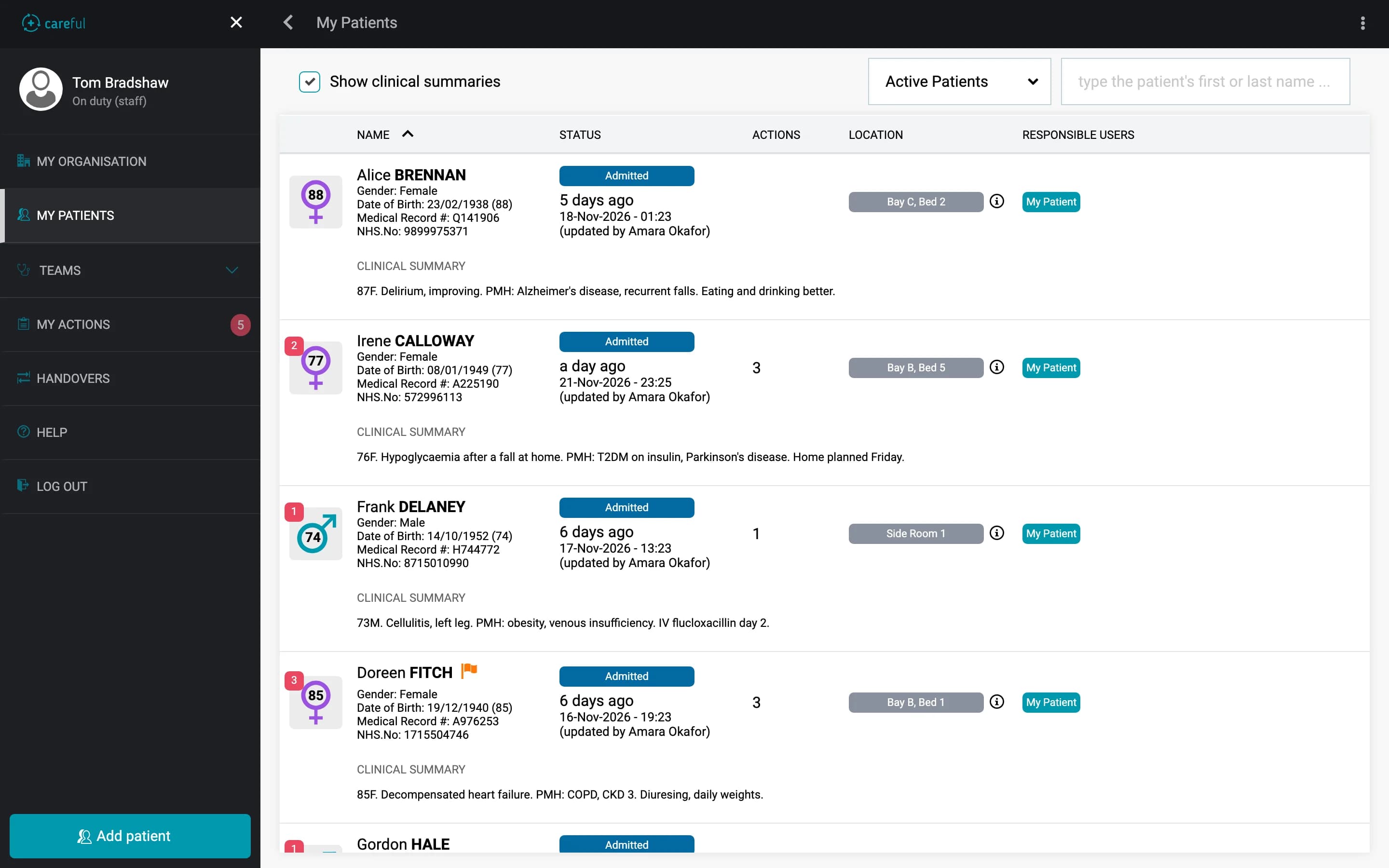 My Patients with Show clinical summaries ticked: each patient's clinical summary under their row
Tip: Selecting a summary opens the patient profile, as selecting the row does. The summary is on the Profile tab.