
Take all users' patients makes you responsible, in a colleague's place, for every patient in a team that they are responsible for. Their open actions for those patients move to you. It happens at once: there is no request for them to accept.
Anyone in the team can do it, team owner or not. You and the colleague must both be in the team. Administrators who are not in the team cannot. You cannot do it to yourself.
Your colleague is not asked first, and CAREFUL does not tell them. If they use the CAREFUL phone app and are on duty, the other colleagues responsible for those patients are told. Each patient's log records one entry, Handover forced, from your colleague to you. It does not list the actions that moved.
It takes only their patients in this team, but it ends their responsibility for each of those patients as a whole. Responsibility belongs to the patient, not to the team. So your colleague is no longer responsible for those patients at all, even if a patient is in another of their teams too. Their patients who are not in this team stay with them. Colleagues who share responsibility for a patient keep it.
Only your colleague's open actions for those patients move. Their other open actions stay with them until someone reassigns them. That includes any for this team's patients they were not responsible for.
The confirmation window asks you to "confirm that you wish to take responsibility for all patients in this team". It does not name your colleague. The window for Take responsibility for all patients shows the same words. Selecting Take Responsibility takes only this colleague's patients in the team, with their open actions for them.
Take all users' patients is in the menu on the colleague's row of the Members tab, once they have accepted their invitation. If their account is disabled, their row shows Take Patients instead. Take Patients shows only while they are responsible for at least one of the team's patients.
CAREFUL refuses if your colleague is responsible for more than 500 patients across your organisation, not only in this team. Its message suggests handing patients over one at a time. Only your colleague can do that. You can still take responsibility for every patient in the team alongside them, with Take responsibility for all patients. Their actions then stay with them.
CAREFUL does not cancel a handover your colleague sent that is still waiting. If its receiver accepts it, they become responsible for the patient as well as you.
Take a colleague's patients before anyone removes them from the team. Once they are removed, their row leaves the Members tab, and nobody can take their patients from there.
Take a colleague's patients in a team
Take a colleague's patients when they cannot hand them over themselves. They may be off sick, called away to an emergency, or gone home without handing over. Their patients come to you in one step, with their open actions for them. Nothing is left waiting for a colleague who is not there.
- Select Teams in the menu on the left, then the team. On a phone, select the menu button at the bottom of the screen first.
- Select Members, then find the colleague.
- Select at the end of their row, then Take all users' patients. CAREFUL opens Force take Users' Patients.
- Select Take Responsibility. CAREFUL makes you responsible, in their place, for their patients in the team, with their open actions for them.
- Check the Patients tab. The rows of the patients you took now show My Patient.
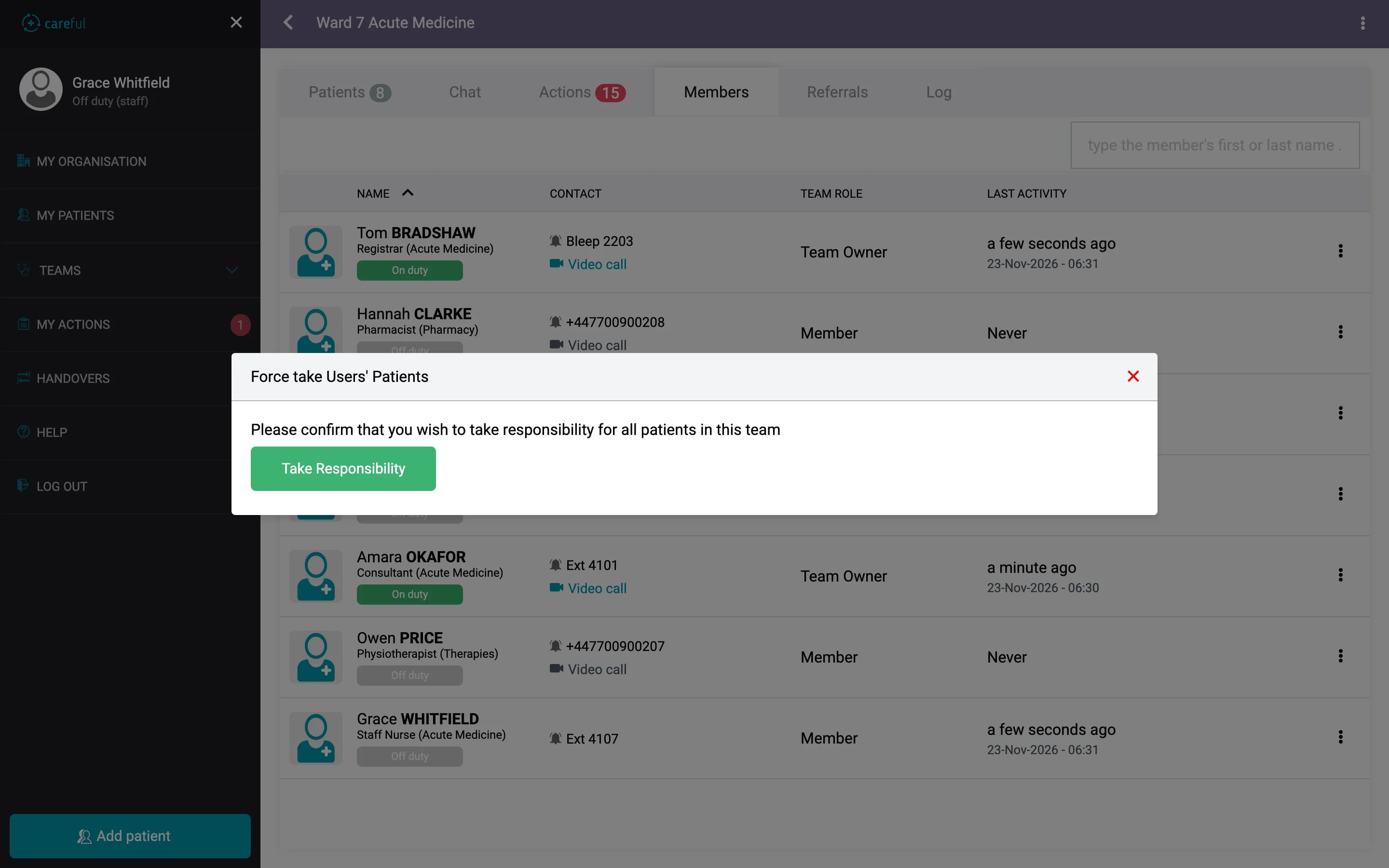 Force take Users' Patients: only the title says it takes one colleague's patients
Tip: The window says "all patients in this team" but takes only this colleague's patients. Only its title, Force take Users' Patients, sets it apart from the window for taking every patient.
Take a disabled colleague's patients
When an administrator disables a colleague's account, the colleague stays responsible for their patients. Their name stays under Responsible users, marked Account Disabled. Take their patients to become responsible for them in your colleague's place.
- Open the team and select Members.
- Find the colleague. Their row shows Account Disabled.
- Select Take Patients. CAREFUL opens Force take Users' Patients.
- Select Take Responsibility. CAREFUL makes you responsible, in their place, for their patients in the team, with their open actions for them.
Tip: Once the colleague is responsible for none of the team's patients, Take Patients leaves their row. Team owners and administrators then see Remove there instead.
Check what you took, and pass on the rest
You now have your colleague's patients in the team and their open actions for them. Some of their other actions may still be waiting with them. You may also have taken more patients than you can look after.
- Select My Actions. Your colleague's open actions for the patients you took are now assigned to you.
- Open the team and select the Actions tab. Sort by Assigned to to find the actions still assigned to your colleague.
- Reassign each of those actions to a colleague who can do it.
- To share out the patients, hand some over to colleagues with Handover Patient on each patient profile.
Tip: The colleague whose patients you took is not told. If they are still marked on duty, a team owner can set them off duty from the Members tab.
More help: Reassign an action to someone else · Hand over a patient to a colleague · Set a team member on or off duty