
Accepting a handover makes you responsible for its patients in your colleague's place. Their open actions for those patients move to you. The patients join your My Patients list and the actions join My Actions.
Only the colleague a handover was sent to can accept it. You accept all its patients together: you cannot take some and leave the rest. To turn it down, reject it instead.
CAREFUL leaves out any patient who is no longer in one of your teams when you accept. That patient stays with your colleague, with their actions. CAREFUL warns neither of you. Its notification to your colleague and the patients' logs report the whole handover as accepted. So the patients that moved to you are the ones now on your My Patients list. Any left out are still on your colleague's list. Your colleague needs to check it too.
If none of the patients is still in one of your teams, CAREFUL cannot complete the handover. It stays in your list until you reject it or your colleague cancels it.
A handover waits on your Handovers page until you accept or reject it, or your colleague cancels it. It does not expire. If your colleague's account has been disabled, Account Disabled shows under their name. Reject is then hidden: you can only accept.
If you use the CAREFUL phone app and are on duty, CAREFUL tells you when a colleague sends you a handover. The message says they have asked to hand over one of their patients, even when there are several. If you are off duty, CAREFUL does not tell you, then or later.
When you accept, CAREFUL tells your colleague, if they use the phone app and are on duty. Nobody is notified about each action that moves. The patient's log records Handover accepted, not each action or change of responsibility. The entry names every patient in the handover, even one who stayed with your colleague.
Accept a handover
Accept when you are ready to take over the patients. That might be at the start of your shift or before a colleague's leave. It might be a patient passed to you from another team, such as from the emergency department to Medicine. Until you accept, your colleague stays responsible for them.
- Select Handovers in the menu on the left. On a phone, select the menu button at the bottom of the screen first. The number beside Handovers counts the handovers waiting for you.
- On the Received tab, find the handover. If it holds several patients, select the row to list them all.
- Note the patients in it. Once you accept, the handover leaves the page.
- Select Accept. For three seconds, the button reads Click to confirm.
- Select Click to confirm. CAREFUL removes the handover from the list.
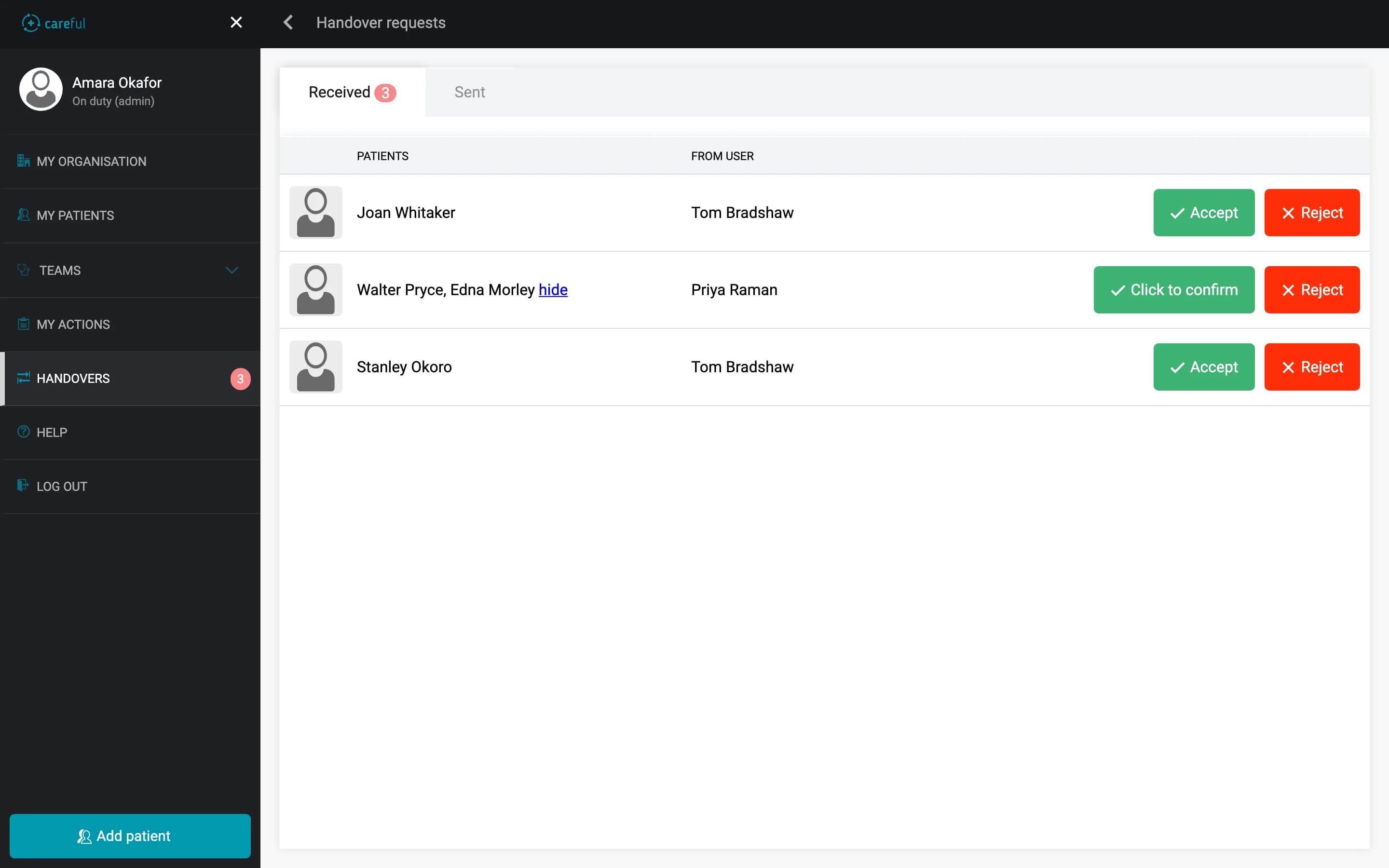 After Accept, the button reads Click to confirm for three seconds
Tip: The patients' names on the Handovers page are not links. To read a record before you accept, open the patient profile from your team's patient list.
Check what moved to you
CAREFUL reports a handover as accepted even when it left a patient out. The handover screens do not list the actions that move either. Check what you now have against the patients you noted before you accepted.
- Select My Patients. Check that every patient you noted is now on your list.
- Select My Actions. Your colleague's open actions for those patients are now assigned to you.
- Open a patient profile. Under Responsible users, your name now shows and your colleague's does not.
- Tell your colleague about any patient missing from your list. That patient is still with your colleague, with their actions.
Tip: A patient is left out if they were in none of your teams when you accepted. The Handover accepted entry in their log still names them.